Elevate Your Winter Projects with the Snowflake Embroidery Digital Set
Capturing the Cozy Elegance of Handcrafted Textiles
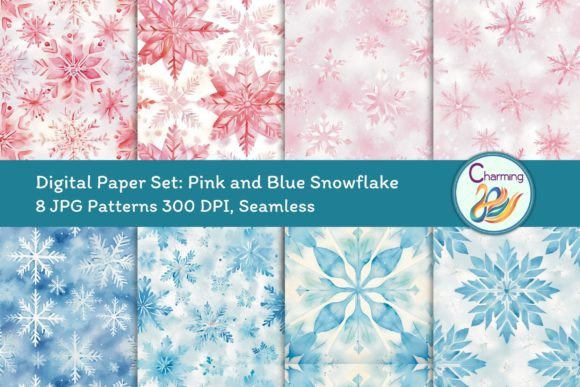
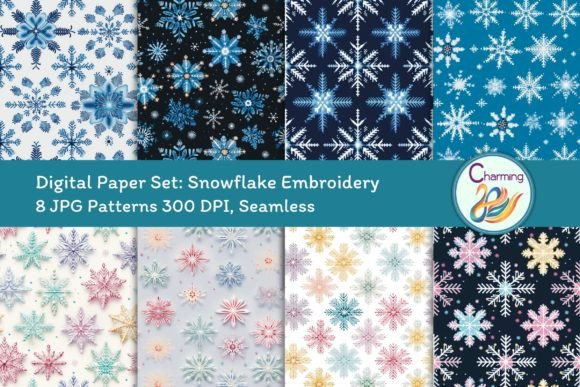
There is a specific kind of warmth that comes from seeing intricate embroidery, a tactile quality that digital files usually struggle to replicate. The Digital Papers Set: Snowflake Embroidery manages to bridge that gap effectively. This collection is not just a series of flat images; it is a carefully curated set of eight JPG patterns designed to mimic the depth and texture of real needlework. When you open these files, you immediately notice the dimensional quality. The snowflakes appear stitched, with subtle thread textures and shadows that give the design a handmade, artisanal personality.
This style appeals to a broad range of creators, particularly those looking for a premium font or asset that feels organic rather than manufactured. It fits perfectly within the "cottagecore" aesthetic or a modern rustic brand identity. The visual style is soft yet structured, balancing the chaotic beauty of nature with the geometric precision of embroidery. It is a design asset that feels personal, making it ideal for projects where you want to establish an emotional connection with the audience.
Practical Applications: From Screen to Stitch
One of the strongest aspects of this set is its versatility regarding resolution and format. With files sized at 3600x3600 pixels at 300 DPI in CMYK, you have professional-grade assets ready for high-end printing. This technical specification is crucial for anyone moving beyond digital screens. If you are working on packaging design for a boutique candle company or creating physical holiday cards, the high resolution ensures that the "stitching" effect remains crisp and does not pixelate.
For digital creators, such as those managing social media graphics or web design elements, these seamless patterns work wonderfully as backgrounds. They provide texture without overwhelming the foreground text. Because the patterns are seamless, you can tile them to create expansive backgrounds for blog headers or digital scrapbooking layouts without worrying about visible seams. This makes the Digital Papers Set: Snowflake Embroidery a robust tool for maintaining visual consistency across large formats.
Specific Use Cases for Entrepreneurs and Designers
- Wedding Invitations and Stationery: The texture adds a layer of sophistication to winter weddings. It pairs exceptionally well with serif typography, creating a classic and romantic vibe.
- Product Mockups: Use these patterns to visualize physical products like tumblers, phone cases, or tote bags. The realistic texture helps customers visualize the final product better than a flat color swatch.
- Restaurant Menu Design: For seasonal menus, particularly during the holiday rush, using a textured background like this can make the layout feel more substantial and curated.
- Editorial Design: Book covers or magazine spreads focusing on winter themes, crafts, or lifestyle content benefit from the tactile appearance of the snowflake embroidery.
Integrating Texture into Your Brand Identity
Choosing a design asset is rarely just about how it looks; it is about how it communicates. Using the Digital Papers Set: Snowflake Embroidery sends a message of care and craftsmanship. In a market saturated with slick, digital-first gradients, a textile-inspired pattern stands out. It suggests that the brand values tradition, warmth, and detail.
However, integrating such a distinct texture requires some strategic thinking regarding font pairing. Because the background is busy and textured, you need to be careful with your typography choices. A highly detailed script font or a complex handwritten font might get lost against the snowflake pattern, reducing readability. Instead, consider pairing these papers with a clean sans serif font or a bold, simple serif font. The contrast between the organic background and the structured text creates a strong visual hierarchy, ensuring your message is readable while the background sets the mood.
Evaluating Project Fit and Licensing
Before finalizing your design, it is worth testing the pattern at the scale you intend to use it. While the file is 12x12 inches, which is standard for digital scrapbooking, you might need to scale it up for large-format posters or art prints. Always zoom in to 100% to ensure the texture holds up at the size of your final output.
Since this is a digital product, you also need to consider your workflow. You cannot edit the individual stitches as you would a vector file in Illustrator; you are working with rasterized JPGs. This means adjustments to color or contrast should be done in Photoshop or similar raster editing software before applying the pattern to your mockups.
Regarding usage, this set is designed for a wide range of applications, from personal home decoration ideas to commercial t-shirt